Solutions · COI tracking

COI tracking software for construction: the AI reads every certificate for you.

The moment a certificate comes in, the AI checks it against your requirements and sends back exactly what’s short. Your AI agent chases the renewals from its own email address, so nobody’s on site with an expired COI.

SOC 2 Type IIU.S. hostedAI optional
In one paragraph

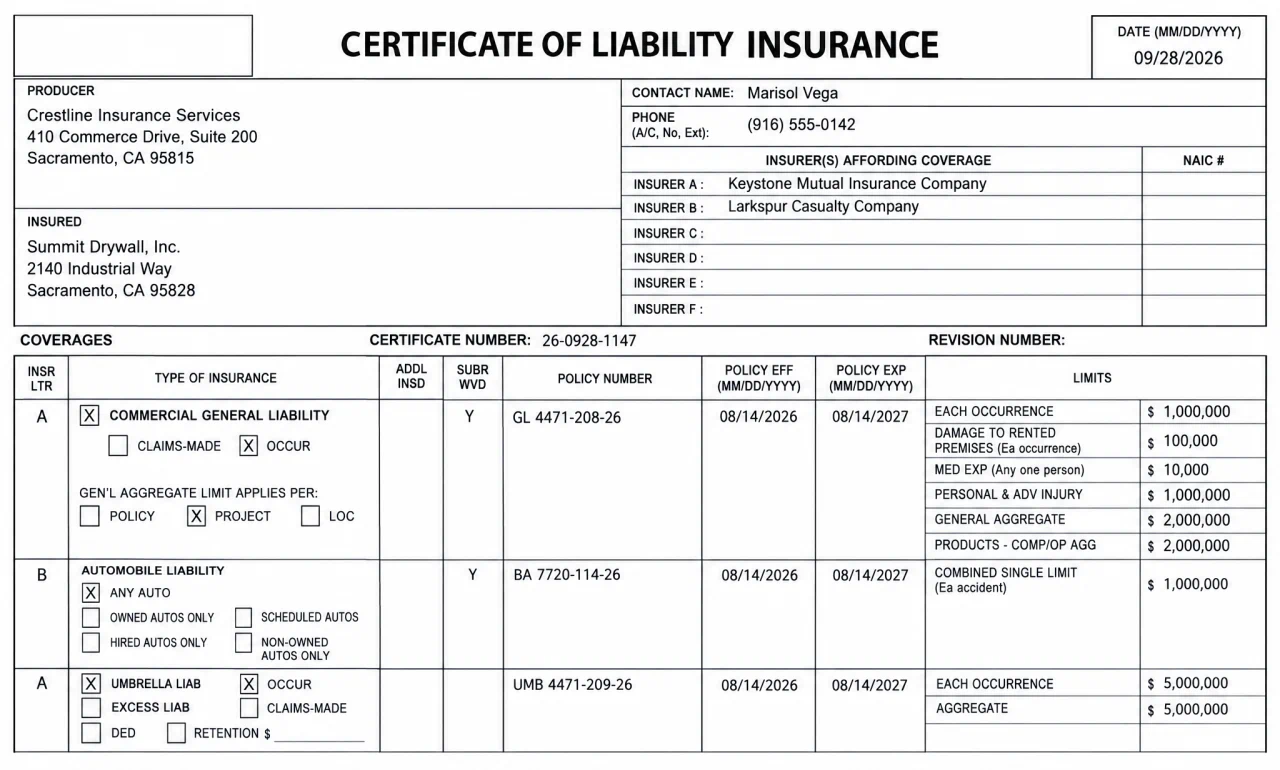
COI tracking software means nobody reads certificates line by line or keeps expiration dates in a spreadsheet. In Contracts Connected the AI reads every certificate against the job’s requirements the moment it comes in, and your AI agent chases the renewals before they lapse.

How it works

The AI reads the certificates. Your AI agent does the chasing.

01Set it once

Tell it what the job requires, once.

Limits, additional insured, waiver of subrogation, whatever the owner’s contract calls for. The AI holds every certificate on the job to it.

02Sent back

Anything short goes back with exactly what to fix.

Your AI agent emails the vendor exactly what’s short, from its own address. The vendor just uploads the fix, and the AI reads it the moment it comes in.

Without the AIPlenty of teams just use the tracker. Reject it with the reason, and the Monday and Wednesday reminders chase the vendor until it’s fixed.

03Renewed

Renewals get chased before anything lapses.

Every expiration goes on the clock. Your AI agent asks for the renewal ahead of time and keeps after it until it’s in.

Without the AIOn the tracker alone, you see every expiration 30, 60 and 90 days out, and the Monday and Wednesday reminders ask the vendor for the renewal.

ThenCovered

You always know who’s covered.

Every vendor’s insurance on one screen, and an expired COI keeps them from being cleared to mobilize.

Watch the AI read a COI on a sample project.

Book a demo
Compared

Most teams track COIs in a spreadsheet and pull them out of email.

  • With Contracts Connected
  • Today: I read every certificate line by lineWith Contracts Connected: The AI reads each one the moment it comes in
  • Today: I’m pulling COIs out of email attachmentsWith Contracts Connected: Your AI agent pulls them from its own inbox and files them
  • Today: We keep expiration dates in a spreadsheetWith Contracts Connected: Every expiration is on the clock, and the agent asks for renewals
  • Today: Vendors show up on site and we don’t know if their COI is currentWith Contracts Connected: An expired COI keeps them from being cleared to mobilize

See your AI agent chase a renewal on a sample project.

Book a demo
Proof

Built by a builder. Run by builders.

The record

Our co-founder ran a large federal general contracting firm for 15 years, about 100,000 documents a year.

Lars HermanCo-founder, Contracts Connected
Read the story
Customers
"What used to be a time-consuming and disorganized process is now streamlined and efficient. With automated workflows, easy document tracking, and seamless collaboration, we've saved countless hours and minimized errors."
Director of Construction OperationsCape Fox Construction Group
AI-first. AI optional.

The AI does as much as you let it. Or nothing at all.

It's one setting for the whole account, and you can change it any time.

Do it yourself · No AI

Your team checks each certificate.

The requirements sit beside the document, the Monday and Wednesday reminders run, and your team accepts or rejects. No AI model touches your documents.

Done with you · The AI reads

The AI reads every certificate.

With the COI Analyzer on, it checks each one against your requirements and tells you accept or reject, with the reason. You make the call.

Done for you · The AI agent

Your AI agent runs it end to end.

From its own email address it chases missing and expiring certificates, answers vendors, reads what comes back and files it. Human in the loop or Auto mode.

Questions people ask about COI tracking

The ones that come up on demos, and how we answer them.

What does the AI check on a certificate?
It reads each certificate against the job’s requirements: coverage, limits, endorsements and expiration dates. It tells you accept or reject and why, and drafts the note back to the vendor when something’s short.
Does the AI decide what gets accepted?
Only if you let it. On Human in the loop it recommends accept or reject with the reason and a person approves. On Auto mode it acts, and everything it does is on the record.
Can the AI agent email vendors for us?
Yes, on Done for you. It has its own email address, writes vendors about what’s missing or expiring, answers their questions and files what comes back.
Does a certificate of insurance prove we’re covered as additional insured?
No. The certificate itself says it’s for information only. Additional insured status comes from the endorsement to the policy, so the endorsement is its own required document here, checked on its own.
Can we use it without the AI?
Yes. Set the account to Do it yourself and no AI model touches your documents. The reminders, the review, the filing and the tracker all work the same.
Is it only COI tracking?
No. The certificate sits in the same place as the contract, the W-9, the license and anything else you require, so one row tells you whether a vendor can mobilize.
Do vendors pay or need software?
No. Vendors set up a free account from the link in their email and upload from a computer or a phone. They never pay.
Does it integrate with our project management and accounting systems?
Yes. We integrate with the systems you already run, from project management to accounting and ERP, whether that’s Procore, Sage, Deltek Costpoint or something else. Each integration is worked out with you, case by case, and built and improved as you need it.

Stop reading certificates line by line.

We’ll show you the AI reading one on a sample project.